Roblox has absolutely exploded over the years. Whether you’re deep into Obby maps, tycoon simulators, anime battlers, or just vibing in Brookhaven, there’s something for everyone. But let’s say you’re trying to jump in without going through the usual download-and-install process. Maybe you’re on a school Chromebook. Maybe you’re on a shared computer. Or maybe… you’re just download-averse. So, the big question is: can you play Roblox without downloading it?
Let’s break it down like a true gamer FAQ. No fluff. Just facts.
What Is Roblox and Why Do You Usually Need to Download It?
Roblox is more than just a game. It’s a full-on game platform. Think of it as the YouTube of gaming, where users build, share, and play games made with Roblox Studio. It runs on everything from iPhones to Xbox consoles.
But here’s the catch. To actually play anything, you need to install the Roblox Player. It’s the engine that launches and runs games. Without it, you’re just window-shopping—browsing titles but not diving in.
So why do people go looking for a download-free method?
- You’re on a device with admin restrictions (hello, school Chromebooks).
- You don’t want to clog up limited storage.
- You’re just Roblox-curious and want a no-commitment test run.
Can You Play Roblox Without Downloading It?
The TL;DR: Not officially.
Roblox doesn’t currently support native browser-based gameplay. You can sign in on Roblox.com and browse games all day. But the moment you click “Play,” the site will prompt you to install the Roblox Player.
There was a time—back in the wild west of browser plugins—when some in-browser play was possible. But Roblox phased that out years ago in favor of a more secure and stable app-based setup.
So, if you’re looking to play directly on Roblox.com with no install, it’s a no-go.
Enter Cloud Gaming: How to Play Roblox in Your Browser with Now.gg
Here’s where things get interesting. While Roblox itself doesn’t support in-browser play, cloud gaming services step in to save the day.
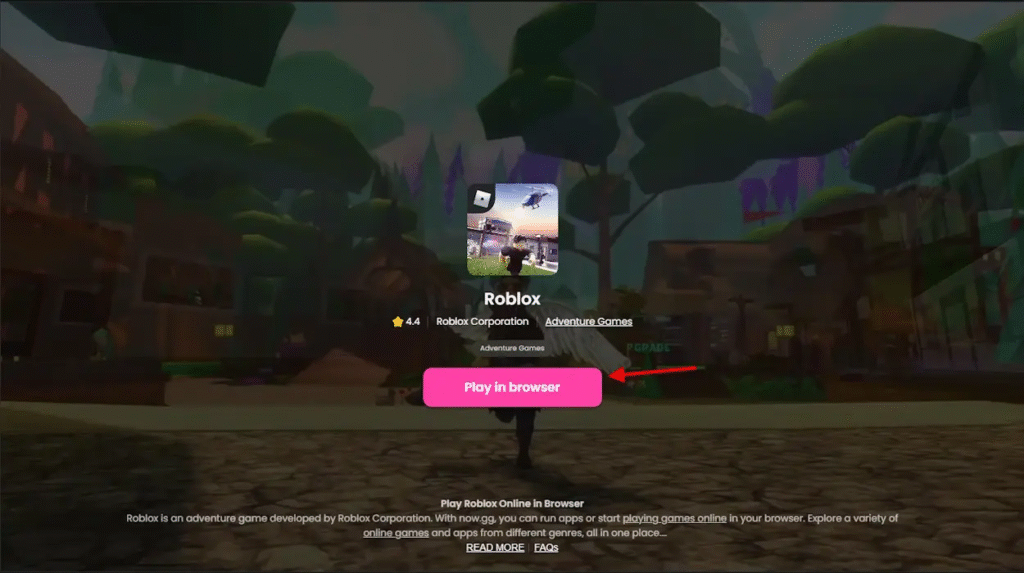
Now.gg: Roblox in Your Browser, No Download Needed
Now.gg is a legit cloud gaming platform that streams the mobile version of Roblox straight to your browser. It runs the game on remote servers, sending the visuals and inputs to your device kind of like Netflix but for games.
How to Get Started:
- Head to now.gg/roblox.
- Click Play in Browser.
- Log in with your Roblox account.
- Start playing, no install, no fuss.
Why it rocks:
- You can play on any device with a browser: Chromebooks, iPads, crusty laptops… doesn’t matter.
- No need to download or install anything
- It supports your existing Roblox account, inventory, and friends list
But heads-up:
- Performance depends heavily on your internet speed
- Some games may be clunky due to mobile controls
- Limited graphics settings or mods
- You may see ads (it’s free, after all)
Note: Now.gg is not owned by Roblox. It’s a third-party cloud platform. It’s widely used and generally safe, but always double-check the URL and never share sensitive info outside the official site.
Other Cloud Gaming Alternatives to Consider
If Now.gg is down, blocked, or just not cutting it, a few other cloud gaming platforms might let you stream Roblox. Though fair warning: they’re a bit more hands-on.
Options Include:
- Shadow PC – You get a full virtual Windows PC in the cloud. Install Roblox like normal, then access it via your browser.
- Boosteroid – Offers select PC games in-browser. Roblox may or may not be supported depending on your region.
- Xbox Cloud Gaming – Since Roblox runs on Xbox, you could stream it if your Xbox Game Pass Ultimate subscription includes it.
- Most of these require a subscription, extra setup, and sometimes even a controller for smoother gameplay.
Is It Safe and Legal to Play Roblox This Way?
Short answer: Mostly yes, with some caveats.
Using your Roblox account through Now.gg or similar cloud services isn’t illegal or against Roblox’s rules. You’re just logging into your own account from another interface. But because these platforms are third-party, caution is always wise:
- Stick to official links (no sketchy clones or redirected URLs)
- Avoid entering sensitive data beyond your Roblox login
- Don’t make in-game purchases through third-party overlays
As long as you’re careful, cloud gaming platforms like Now.gg are considered a safe and legit way to play.
Why Even Bother Playing Roblox Without Installing It?
This is where the browser method really shines:
- School Laptops or Chromebooks: Downloads are usually blocked. Cloud gaming sneaks around those restrictions.
- Shared or Library PCs: You don’t want to install games on someone else’s machine.
- Low-Storage Devices: If your device is already running on fumes, cloud gaming saves the day.
- Just Browsing the Hype: Want to see what Roblox is all about without the hassle? Cloud play is perfect for that.
Browser-Based Games Like Roblox (No Login or Install Required)
If Roblox cloud gaming isn’t working for you, try these free browser-based games. No installs, no accounts, just straight-up fun.
| Game Title | Genre | Link |
|---|---|---|
| Krunker.io | FPS | krunker.io |
| Zombs Royale | Battle Royale | zombsroyale.io |
| Minecraft Classic | Sandbox/Creative | minecraft.net/classic |
| Toca Life World (Web) | Simulation (for kids) | Varies by platform |
They’re not quite Roblox, but they scratch that creative or chaotic itch without any install drama.
Final Verdict: Can You Actually Play Roblox Without Downloading It?
Not through Roblox itself. But cloud gaming gets you surprisingly close.
Now.gg is the go-to option if you want to play Roblox in a browser without downloading anything. It’s perfect for school devices, curious newcomers, or anyone running on low storage.
Still, if you’re after peak performance, smooth graphics, and full controls, installing the official Roblox Player is the best route.